
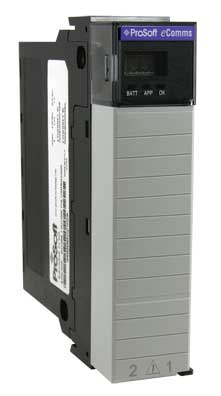
ProSoft ILX56-MM
 Free Shipping
 1 Year Warranty
 A+ Rated On The BBB
 10% Off First Order
 Based In The USA
Description
The ProSoft Technology inRAx Message Manager is a single-slot solution that connects and transfers Factory and Plant Process Automation monitoring and control data between islands of automation across diverse platforms, networks and protocols. The inRAx Message Manager is an easy-to-use data transfer engine for the ControlLogix 1756 platform, supporting Rockwell Automation Programmable Logic Controller (PLC) and Programmable Automation Controller (PAC) network protocols, as well as platforms and devices that use Siemens Industrial Ethernet and Modbus TCP/IP protocols. The ILX56-MM makes it easy for System Integrators and End Users to reduce the engineering effort required to coordinate data transfers between multiple control systems in Factory and Plant Automation applications. The Message Manager simplifies and streamlines data connection and transfer operations by enabling PLC/PAC data exchanges without the need for additional message-specific PLC programming.
ProSoft Technology ILX56-MM is now available from Williams Automation.
If you need a specific firmware version or series for this item, please call or email us with your request. We can also provide specifications and/or a data sheet for this item upon request. Please call or email us if you need one.
We offer Overnight shipping for most items listed on our website. Please get in touch with us to confirm whether the product can ship overnight on the day of your order. Cutoff times are typically 2-3 PM EST. Lead times can range from 1 to 4 business days.
Call (803) 761-7027 if you have any questions about availability, or email us at sales@williamsautomation.com.
Specifications
- Configuration Data
- Can be saved offline or saved to the on board compact flash card.
- Configuration Utility
- Contains built-in Help functions. On-Line configuration only
- Data Transfers
- Transfer data between up to 16 individually-configurable communications Interface connections
- Interfaces
- Choose RA, Modbus TCP/IP, or Siemens IE protocol for each Interface
- Internal Date and Time
- Can be set manually or synchronized with ControlLogix or CompactLogix. The frequency of synchronization can be: No frequency, Hourly, Daily, Every 8 hours, or Every 12 hours.
- Protocols Supported
- Modbus TCP/IP and Siemens Industrial Ethernet supported via the built-in Ethernet ports. EtherNet/IP, ControlNet, Data Highway+ (DH+) and Data Highway 485 (DH485) are supported through Rockwell Automation (RA) 1756 communications bridge modules.
- Security
- No login required to view configuration information. Must log in to make configuration changes. PROJECT-level users may make configuration changes and start/stop data transfer operations (i.e. switch between RUN and IDLE). ADMINISTRATOR-level users may make Project -level changes as well as assign usernames, passwords, and security access levels for all users.
- Setup Mode
- Setup Mode temporarily sets the Message Manager network port settings to their default values. Setup Mode also allows you to reset the default administrative password.
- Tags
- Browse and use tag names from any RA PAC in a ControlLogix local or remote chassis or any Allen-Bradley PLC or RA PAC connected across supported bridged networks. Create user-defined Tags for Modbus and Siemens data addresses.
- Transfer Lists
- Create data exchange lists using source and destination Tags
- Triggers
- Define events that will cause one or more Transfer Lists to be executed. Triggers can be based on Tag values or scheduled time intervals.
Reviews
What our customers say
 BBB 4.7
  Rating
 they have quick great service and quick shipping!! would recommend doing business over and over!!
January 7 on 

Great price and speedy delivery. I am certain, based on my first statement that if needed, customer support will be excellent
December 31 on
Great customer service, fast shipping. Nice to deal with a company that shows they care about their customers.
December 5 on
I got the part and it was exactly what i needed to get my dust collector up and running again! It was also at very reasonable price. Thanks!
December 4 on
Another great purchase from Williams Automation. You will have peace of mind knowing your getting authentic parts from Williams Automation. Very easy to work with and great customer service. Plus you get at a competitive price and not three times what it should be.
November 6 on
Exceptional customer service! They had the elusive part I required readily available and responded promptly to all my emails.
November 2 on
Great customer service. Had the hard to find parts I needed in stock. All emails answered promptly.
October 9 on
Had what I needed in stock, shipped fast and arrived within the time frame indicated. It was packaged securely.
August 28 on
Perfect purchase! The whole process was great, including the packaging and shipping. Finally a company who cares!
August 13 on
Great service and Best prices ! Very organized company and helpful too. Will definitely buy again
August 10 on